Showing posts with label sound. Show all posts

Sunday, September 10, 2023

[Solved: 7 hours] reliable HDMI configuration under PulseAudio

NB: solution only takes 20 mins, but it took me an entire NFL Sunday to troubleshoot. All of this is only if the pavucontrol box cannot be expanded to include "Configuration" or nothing is there.


As we know, PulseAudio is one of the worst solutions to a non-problem1 ever devised. It's so blatantly unhelpful that I suspect the two prior, more reliable and configurable, sound systems -- OSS and ALSA -- might have been sunk by DMCA (the usual supsect in crippled media reliability). Eg, are there any OSS drivers for newer hardware? Is there any documentation about inscrutable ALSA subroutine calls? We have little choice but to live with PulseAudio these days unless we're willing to fund a project to document ALSA or update OSS drivers.

two problems, two solutions

Problem 1: HDMI cable is disconnected, no sound in host

The HDMI cable is connnected and audio is coming from the monitor. But if I disconnect the HDMI cable, audio ceases entirely instead of switching/returning to the laptop speakers. So I lose audio entirely when I disconnect the HDMI cable.

I open pavucontrol. I see this...

  1. no sound from monitor of course, b/c HDMI cable is disconnected
  2. it appears there are menu options for "Port" but "HDMI/DisplayPort Unplugged" is the only option. The arrow produces no options to return sound to speakers.
  3. re-attaching the HDMI cable only randomly results in a return to a picture and sound at the monitors

solution

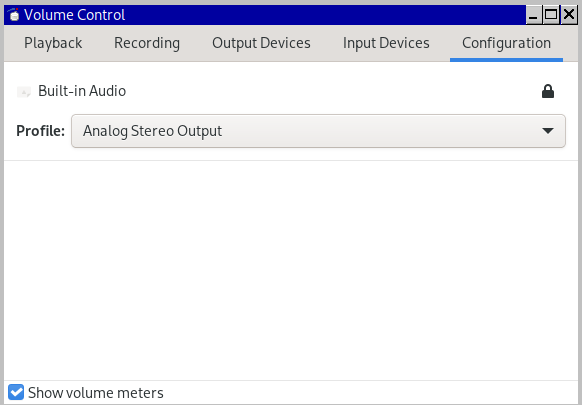
Port options are available but are hidden. Click the arrow circled in red to reveal an additional column, "Configurations".

Within "Configuration" (below), we can select different options in the drop-down menu of "Profile" ("Port" above only gave a false appearance of options). When I selected "Analog Stereo Output", audio returned to my laptop speakers.
Problem 2: HDMI cable is reconnected, no sound in monitor

Typically, our speaker audio will also stop when we reconnect the HDMI cable, so that we're once again entirely without audio. But this was a more complex problem to solve.

What worked for me was to gather device info and insert it into /usr/share/alsa/alsa.conf to make it less generic. During reconnection, my default configuration seemed unable to distinguish the correct hardware. It might have been too vague.

I first examined the HDMI connection in light of two programs.

part A -- gather aplay and xrandr info

$ aplay -l
**** List of PLAYBACK Hardware Devices ****
card 0: PCH [HDA Intel PCH], device 0: ALC3235 Analog [ALC3235 Analog]
Subdevices: 0/1
Subdevice #0: subdevice #0
card 0: PCH [HDA Intel PCH], device 3: HDMI 0 [HDMI 0]
Subdevices: 1/1
Subdevice #0: subdevice #0
card 0: PCH [HDA Intel PCH], device 7: HDMI 1 [HDMI 1]
Subdevices: 1/1
Subdevice #0: subdevice #0
card 0: PCH [HDA Intel PCH], device 8: HDMI 2 [HDMI 2]
Subdevices: 1/1
Subdevice #0: subdevice #0
$ xrandr
eDP1 connected primary 1366x768+0+0 (normal left inverted right x axis y axis) 280mm x 160mm
DP1 disconnected (normal left inverted right x axis y axis)
HDMI1 connected (normal left inverted right x axis y axis)
HDMI2 disconnected (normal left inverted right x axis y axis)
VIRTUAL1 disconnected (normal left inverted right x axis y axis)
So we can see that HDMI1, which is hw 0,7 in this system, is the subdevice we want to configure.

part B -- modify /usr/share/alsa/alsa.conf

Use the HDMI1 information gathered above to add subdevice 7 (in this case) into the alsa control file.

# nano /usr/share/alsa/alsa.conf
defaults.ctl.card 0
defaults.pcm.card 0
defaults.pcm.device 0
defaults.pcm.subdevice 7

Now when we reboot our system, and connect and reconnect HDMI cables, we should see the option (as in "1" above) in pavucontrol, AND we should see that we have an ELD handshake.

$ grep eld_valid /proc/asound/card0/eld*
/proc/asound/card0/eld#2.0:eld_valid 1
/proc/asound/card0/eld#2.1:eld_valid 0
/proc/asound/card0/eld#2.2:eld_valid 0
/proc/asound/card0/eld#2.3:eld_valid 0
/proc/asound/card0/eld#2.4:eld_valid 0
/proc/asound/card0/eld#2.5:eld_valid 0
/proc/asound/card0/eld#2.6:eld_valid 0
/proc/asound/card0/eld#2.7:eld_valid 0
/proc/asound/card0/eld#2.8:eld_valid 0

additional notes

Never works

This is a good page, however none of these work:
$ pacmd "set-default-source alsa_output.pci-0000_04_01.0.analog-stereo.monitor"
$ pacmd "set-default-sink alsa_output.pci-0000_04_01.0.analog-stereo.monitor"

slight digression

In addition to our ears, we can verify a successful EDID handshake between our laptop and the monitor (via the HDMI cable). With the HDMI cable plugged in, we have a valid HDMI connection wherever we have a "1" inside /proc/sound/. When there's no sound, it will be all zeros, such as this example...

$ grep eld_valid /proc/asound/card0/eld*
/proc/asound/card0/eld#2.0:eld_valid 0
/proc/asound/card0/eld#2.1:eld_valid 0
/proc/asound/card0/eld#2.2:eld_valid 0
/proc/asound/card0/eld#2.3:eld_valid 0
/proc/asound/card0/eld#2.4:eld_valid 0
/proc/asound/card0/eld#2.5:eld_valid 0
/proc/asound/card0/eld#2.6:eld_valid 0
/proc/asound/card0/eld#2.7:eld_valid 0
/proc/asound/card0/eld#2.8:eld_valid 0

If the HDMI cable is connected and we see the above, then either the cable is bad, or the computer is failing to detect that there's a good HDMI cable connection.

Either way, we should have sound in our (eg laptop) speakers in such cases. So back to our main story.

Sometimes works

This sometimes works to add a way to toggle between analog speakers and digital HDMI, with both plugged-in. Sometimes.

# nano /etc/pulse/default.pa
### Load analog device - must be first
load-module module-alsa-sink device=hw:0,0
load-module module-combine-sink sink_name=combined
set-default-sink combined

a few helpful commands

$ pulseaudio --kill
# alsactl restart

1 Both OSS and (subsequently) ALSA worked fine, but they needed more development as time progressed. Unfortunately, neither had enough DMCA protections to please the patent trolls. Enter PulseAudio, the *solution*, with the plausible patent deniability that it was designed to work "across platforms" LOL.

Sunday, December 22, 2019

video card replacement - hdmi

Although it looks imposing and is potentially a solid choice, I became tired (2019) of the 2Gb nVidia GeForce GTX770 (GK104 Audio Controller onboard) that came with my system.
Maybe it's an nVidia thing, but it had the nasty habit of ramping-up sound instead of turning audio on immediately. This meant that, after any silence, sound always returned smoothly, however it made video editing impossible. Sound needs to match video precisely and, since we're not going to play back video on only this nVidia system, we need to know volumes exactly, not with system-specific audio ramping.

nVidia vs Radeon

According to the proprietary utility nvidia-settings (in the nVidia driver), my motherboard has a PCIe Gen3(16bit) slot. I'm not a gamer, but for Blender's sake, I doubled GPU RAM with a 4Gb Polaris based AMD Radeon RX560D.
Again, however, the main factor is having audio that works correctly. There was simply nothing I could do to stop the nVidia card audio ramping. All automuting, all of that was disabled, but the nVidia sound always ramped instead of immediate.

Remove nVidia software

Once replaced, i uninstalled the nVidia module in favor of amdgpu module.It's just sitting there and not being used so it doesn't really hurt anything, but it's a 200Mb of orphaned stuff. I ran # pacman -Ss nvidia to see what I had installed and removed all of them...
# pacman -Rdd libvdpau libxnvctrl nvidia nvidia-utils

audio

When I had the nVidia card, I was never able to pass the dreaded same-named sound card issue...
$ cat /proc/asound/modules
0 snd_hda_intel
1 snd_hda_intel
...which would sometimes provide sound and sometimes static.

libva v libvdpau

I still don't understand if I'm supposed to have both the Intel and the nVidia video hardware acceleration. I knew that va was intel and vdpau nVidia, so which/what to use on with the amdgpu and a Radeon. At some point, because Chromium appeared to favor vdpau, I installed vdpau, and did so by installing its utility, vdpauinfo...
# pacman -S vdpauinfo
... which also brought in libvdpau. Following this, Chromium opened normally, and YouTube functioned.

xorg

With the nVidia software removed and the amdgpu package installed, X refused to initialize. The error and the solution discussion are here. The solution required a change to /etc/mkinitcpio.conf...
MODULES=(amdgpu)
... and then
# mkinitcpio -p linux
After this, X loaded normally.

Sunday, December 15, 2019

sound and systemd, restart sound

Running HDMI means dealing with two audio chips -- the first on the motherboard and a second on the video card, where the A/V HDMI cable is connected. Many things can therefore derail the sound. In this case it was an Arch update, causing some conflict with the kernel. But each failure has to be solved by a process of elimination. ALSA is embedded into the kernel, so that systemd is the way to restart.
# systemctl restart alsa.restore.service
Should d

Let's suppose the connected HDMI device at the other end of the cable is putting out clean video. Now let's suppose the audio is also present, but that it sounds distorted: chipmunky or maybe raspy or fuzzy, like a bad AM radio connection. We know that at least one of the audio chips IS working if sound is present at the output. But solving the distortion many not be easy. Perhaps the wrong sound chip, both chips simultaneously, or that the correct chip has incorrect settings. You've done everything here and the gold standard...
$ aplay -D plughw:1,7 /usr/share/sounds/alsa/Front_Center.wav
...for your particular hardware, which you correctly determined with...
$ aplay -l

Suppose this is in spite of Pulseaudio being effectively disabled , /usr/share/alsa/alsa.conf successfully sterilized of hooks, and /etc/asound.conf, ~/.asoundrc, and ~/.config/asound.conf having been successfully deleted.

Suppose also that we have...
$ systemctl list-unit-files |grep alsa
alsa-restore.service static
alsa-state.service static

$ systemctl list-units |grep sound
sys-devices-pci0000:00-0000:00:01.0-0000:01:00.1-sound-card1.device loaded active plugged GK104 HDMI Audio Controller
sys-devices-pci0000:00-0000:00:1b.0-sound-card0.device loaded active plugged 7 Series/C216 Chipset Family High Definition Audio Controller
sound.target loaded active active Sound Card
... well then WTF is going on? We can see ALSA is properly "static" and therefore compiled into the kernel. We can see that both hardwares examine some of those systemd service modules inside /etc/systemd/system/, but this does not seem to be the problem.

possibility 1

Suppose you still have an unaddressed situation of both sound cards receiving the same name from the kernel
$ cat /proc/asound/modules
0 snd_hda_intel
1 snd_hda_intel

Thursday, June 13, 2019

Disable speaker w/headphone Intel NM10/ICH7 Audio

The Intel Corporation NM10/ICH7 Family High Definition Audio Controller (rev 0) is a common audio chip in many laptops, but it has a Linux limitation. The ALSA mixer (alsamixer) has no setting for disabling the speakers when the headphones are inserted. A cacophony of dual headphone and speaker sounds, playing 1 second apart, is the result. Further, because it's the sound system, not the error notification system (beeps, etc), the customary disabling of pcspkr will not stop double sounds. Once configured, we'll want to reload it by creating a /etc/rc.local to do alsactl restore. This can be verified by running chkconfig alsa-utils.

1. disable pulseaudio

Worthless pulseaudio has been addressed many times in my blogs. Check this link, or some other you prefer, for how to disable it.

2. alsactl

# alsactl store
Running this command generates the file /var/lib/alsa/asound.state. Unlike the 5 visible controls in alsamixer, the true 23 settings of the card are revealed inside asound.state. It's the file to make adjustments which silence speakers during headphone use.

Saturday, January 31, 2015

[solved] more on Arch sound (fix for chipmunk sound)

No reasonable person likes PulseAudio currently. It's also a mystery why it was ever developed instead of, say, simply enhancing OSS (so we would only have one sound daemon). But, since OSS and ALSA were left behind, it goes without saying that, over time, a Linux distribution is near-certain to become infected with PulseAudio -- it will automatically be installed as a dependency by one application or another. Eventually, PulseAudio is almost certain to interfere with something, for example to make Audacious play MP3's at a chipmunk's pitch. As I write in early 2015, the strategy that works for me is,

crippling Pulse-Audio without removal

You can try a straight-up # pacman -Rs pulseaudio, but dependencies tend not to allow this. So cripple it.
Note: the PulseAudio daemon respawns if not properly neutered.
  • obviously start with $ pulseaudio --kill
  • directory /usr/share/alsa/alsa.conf.d hides a PulseAudio file (50-pulseaudio.conf) which ALSA executes during ALSA startup. This file surreptitiously activates /bin/pulseaudio. Rename it so it's no longer executed, eg "cp 50-pulseaudio.conf 50-pulseaudio_conf.bak", OR change /bin/pulseaudio to /bin/true in the file.
  • stop PulseAudio autospawning by gutting /etc/pulse/client.conf and replacing its lines with
    # custom version
    autospawn = no
    # "/bin/true" doesn't do anything, but no errors
    daemon-binary = /bin/true
  • Check inside /etc/X11/xinit/xinitrc.d to be sure X11 isn't infected. Eliminate any PulseAudio files in that directory.
  • $ systemctl list-units |grep pulse to verify no systemctl pulseaudio targets are present

/usr/share/alsa/alsa.conf vs. /etc/asound.conf

These initializing files use the same commands and formats, as well as one other config file, ~/.asoundrc. Since all 3 files are ALSA initializing files, only one is necessary, delete the other two to avoid interference. I typically keep /usr/share/alsa/alsa.conf because it's the most complete out-of-the-box, and because so many applications (eg. Audacious) load it. Save a copy of the working version for future installs. Not sure how to activate the file under systemd, so I just logout and log-in to be sure the file is read. Next, the alsa.conf configuration.

/usr/share/alsa/alsa.conf ("USAA" here)

USAA has a few problems itself.
  • backup the default USAA, eg # cp /usr/share/alsa/alsa.conf /usr/share/alsa/alsa_conf.bak. Backup any other files that are modified as well.
  • USAA's first subroutine is to load /etc/alsa.conf and /home/foo/.asoundrc. These can have PulseAudio hooks that wrongly set playback frequency. Carefully delete this subroutine, from
    [
    {
    func load
    files [
    {
    @func concat
    strings [
    { @func datadir }
    "/alsa.conf.d/"
    ]
    }
    "/etc/asound.conf"
    "~/.asoundrc"
    ]

    errors false
    }
    ]
    ...to....
    @hooks [
    {
    func load
    files [
    {
    @func concat
    strings [
    { @func datadir }
    "/alsa.conf.d/"
    ]
    }
    ]

    errors false
    }
    ]
    and save.
  • backup and then eliminate any of these which exist
    1. /etc/asound.conf
    2. ~/.asoundrc
    3. ~/.config/asound.conf

NB: There is *one* situation where I occasionally want ~/.asoundrc, albeit customized. If I have an external USB mic and some application won't simply accept its direct information, eg "plughw:1,0", I can turn it into a second soundcard that's providing content. Of course, there is no playback via the mic. Audacity, for example, likes this arrangement.

verify

Logout, log back in, and then try an Audacious or command line play, etc... $ aplay somefile.mp3

Wednesday, December 25, 2013

PulseAudio reconsidered - hail OSS, ALSA

Links: arch wiki pulseaudio :: record system in pulseaudio (GUI) ::
record system in pulseaudio (CLI) :: ALSA configuration :: best disable link so far (3/2014)

Linux sound management and the changing nature of Linux initialization schemes are the bad things about Linux. In this post, it's about sound. PulseAudio, on the scene since perhaps 2009, but currently (2014) prevalent, has made the sound kludge even worse1.

OSS - still good

My Linux use began when OSS was the only sound daemon communicating with hardware. OSS had bugs, but it was straightforward, and therefore was a good foundation which should have been developed further instead of dumped.

I'm not a recording engineer, but I never encountered the two main purported limitation of OSS, 1) an inability to process simultaneous sound sources (, eg. capture a mic input at the same time as a music stream) nor 2) a supposed incapacity to split a single sound source into multiple types of files simultaneously.

When I wanted to listen to several files through the speakers and to, simultaneously, capture the output (stdout) into a single WAV file, I piped them through sox. For example, in this case, I created a script which played several audio files in sequence, and I used sox to collate the output into a single file:
$ somescript.sh | sox -t ossdsp -w -s -r 44100 -c 2 /dev/dsp foobarout.wav
That's all there was to it.

ALSA - meh

When ALSA became common, the the simple approach of /dev/dsp was gone. In ALSA, we had to locate soundcard info with aplay-l, aplay -L, /proc/asound/pcm AND /dev/sound/. Some software couldn't handle the ALSA layer, and we'd have to name the device. Only now it wasn't generically, /dev/dsp. So we'd have to research its PCI values and provide literal device information such as "hw:0,0". Another problem was lost hours configuring daemons. As users, we'd sort of have to choose between OSS or ALSA and be certain we'd blackballed the modules of the other. It's unclear what benefit ALSA provided, in other words.

Consider the play/capture scenario I described above. Under ALSA, a similar effect should have been available by researching ALSA commands. That's already wasted time (duplication of effort) to achieve the same outcome, but it also turns-out the the ALSA commands were not as reliable. For example...
$ somescript.sh | arecord -D hw:0,0 -f cd foobarout.wav
... often would result in a string of error messages regarding "playback only", even though capturing had been enabled in ALSA, etc. To me, it seemed that ALSA, and not OSS, had multiplexing limitations.

Further, the C code of the ALSA "dmix" lib, which one would think was created exactly to solve this problem gives no respite...
ALSA lib pcm_dmix.c:961:(snd_pcm_dmix_open) The dmix plugin supports only playback stream
Lol. In the end, the only helpful plugin (of course with nearly zero documentation and an unintuitive name), is the asym plugin. For this you'd have to become aware of it in the first place, not so easy, nor will you escape having to build and tweak an /etc/asound.conf and/or an .asound.rc. Have fun.

PulseAudio

Instead of simply developing either ALSA or OSS more completely, some group developed PulseAudio. PulseAudio purported to make muxing easier than ALSA which purported to make muxing easier than OSS. "Lol". Lol because ALSA and/or OSS continue to be layers underneath PulseAudio. So now we add PulseAudio memory and CPU loads to those of both the OSS or ALSA modules running beneath PulseAudio. These three different directions at once also raise the potential for errors. And if you think PulseAudio makes configuration any easier, take a look here.

After PulseAudio configuration, recording my script requires the same steps as capturing streaming. It's too much information to regurgitate entirely here, but the shorthand is:
$ pavucontrol (set "Record Stream from" to "Monitor of Internal Audio Analog Stereo")
$ somescript.sh | parec --format=s16le --device=(from "pactl list") | oggenc --raw --quiet -o dump.ogg -
There is also hypothetically an OSS emulator called "padsp" (install ossp in Arch) with which one could use sox again. That is, PulseAudio apparently uses an emulator instead of just accessing a real OSS module. I haven't tried "padsp", but it may work.
$ padsp sox -r 44100 -t ossdsp /dev/dsp foobarout.wav

PulseAudio crippleware effect

Once PussAudio has ever been installed, even inadvertently as a dependency for some other application, and even when you're sure its daemon is not running (), one's soundcard will likely be reduced to analog mode. Eg, after Puss Audio was installed, but its daemon not running, I observe...
$ aplay -l
**** List of PLAYBACK Hardware Devices ****
card 0: SB [HDA ATI SB], device 0: ALC268 Analog [ALC268 Analog]
Subdevices: 1/1
Subdevice #0: subdevice #0
...when I should instead see...
$ aplay -l
**** List of PLAYBACK Hardware Devices ****
card 0: SB [HDA ATI SB], device 0: ALC268 Analog [ALC268 Analog]
Subdevices: 1/1
Subdevice #0: subdevice #0
card 0: SB [HDA ATI SB], device 1: ALC268 Digital [ALC268 Digital]
Subdevices: 1/1
Subdevice #0: subdevice #0
Results will be similar in $ arecord -l. There's no way to capture one's system in ALSA properly again until it detects the entire soundcard. If we'd like, we can even see the problem more clearly:
$ aplay -L
null
Discard all samples (playback) or generate zero samples (capture)
default
Default ALSA Output (currently PulseAudio Sound Server)
sysdefault:CARD=SB
HDA ATI SB, ALC268 Analog
Default Audio Device
front:CARD=SB,DEV=0
HDA ATI SB, ALC268 Analog
Front speakers
[remaining 4 entries, all analog dev=0, snipped]
That is, even with PussAudio disabled, ALSA remains infected with the PulseAudio Sound Server, and analog limitations.

PulseAudio disabling

Link: excellent disabling instructions
We'd like to disable PulseAudio, but we'd prefer not to uninstall PulseAudio --- for example, it's understood that some Gnome sound functions with hooks in PulseAudio libs may not otherwise work. We know from above that it's not enough to simply disable its daemon.
file note
/etc/pulse/ dir: pulse audio config files
/etc/modprobe.d/alsa-base configuration for ALSA modules
/usr/share/alsa/ dir: alsa config files
/etc/asound.conf alsa config file for pulse
/usr/share/alsa/default.pa change ALSA hooks
/etc/pulse/default.pa change PulseAudio hooks

1. $ pulseaudio -k
2. # pacman -r pulseaudio-alsa
3. # rename /usr/share/alsa/alsa.conf.d/*.conf /usr/share/alsa/alsa.conf.d/*.bak
...to be continued.

1 Some configurations even include a Music Player Daemon ("MPD"), and/or a Simple Direct MediaLayer ("SDL"), ridiculous 4th and 5th possible layers.